Usage Guide
Searching for a Class
Type in the search box on the left. Results update after a 200 ms debounce.
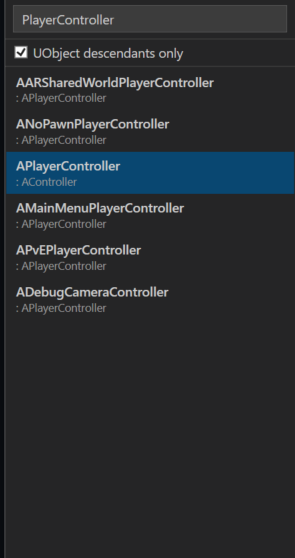
Search matches against both the class name and the parent class name, so typing Actor will surface AActor, ACharacter, APlayerController, and anything else whose parent contains “Actor”.
Results are ranked:
- Exact match
- Starts with query
- Contains query (class name)
- Parent-name match only
When search is empty, the following common base classes are pinned to the top of the list:
AActor · APawn · ACharacter · AGameModeBase · APlayerController · UActorComponent · USceneComponent · UObject · UUserWidget · UGameInstance · UGameInstanceSubsystem · UWorldSubsystem
Check UObject only to narrow the list to classes that derive from UObject. Useful when you know you need a UCLASS-based type and want to exclude plain C++ structs and unrelated hierarchies.
Selecting a Parent Class
Click any class in the results list to select it as the parent. The right panel updates to show:
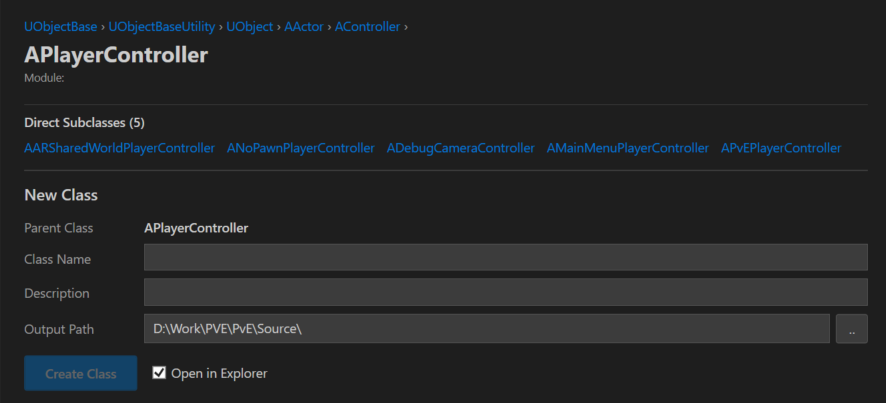
- Ancestry chain — the full inheritance path from root to the selected class (e.g.
UObject → AActor → APawn → ACharacter). Click any ancestor to select it instead. - Direct subclasses — up to 5 are shown initially. Click Show all to expand the full list. Click any subclass to navigate to it.
Generating a Class
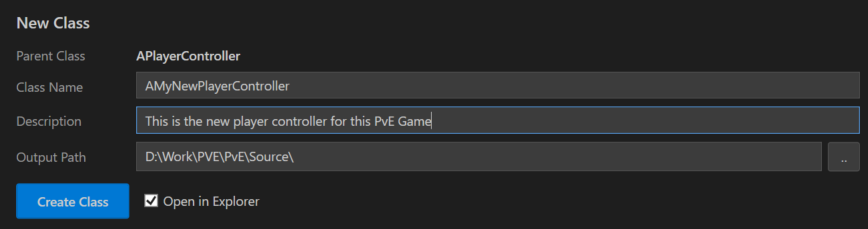
With a parent class selected, fill in the generation form on the right:
| Field | Notes |
|---|---|
| Class name | The full class name including prefix, e.g. AMyActor. A warning appears if the name is missing the expected A prefix (Actor-derived) or U prefix (UObject-derived). |
| Description | Optional. Populates the Description field in the file header comment. Defaults to TODO: if left blank. |
| Output path | The directory to write files into. See Output Path Routing for how .h and .cpp are split automatically. |
Click Browse to pick a folder, then Create Class.
After creation the status bar shows where the files were written. If Open in Explorer after create is enabled, Explorer opens to the output folder automatically.
Standalone Class or Struct
You don’t need to select a parent class. The New Class and New Struct buttons in the toolbar create a class or struct with no parent.
- New Class — generates a plain C++ class (no
UCLASS()/GENERATED_BODY()) - New Struct — generates a header-only struct file using
Struct.mustache- Check USTRUCT to add
USTRUCT()andGENERATED_BODY()macros
- Check USTRUCT to add
Struct generation also triggers automatically when the selected parent class is an F-prefixed type (e.g. FTableRowBase).
Settings
Settings are saved to %LOCALAPPDATA%\UEClassCreator\settings.json and persist across sessions. Company name is set at the top of the right panel and appears in the copyright header of every generated file. The UObject only filter and Open in Explorer after create checkbox are also persisted globally.
Per-project state — last output path and last selected class — is keyed to the .uproject path and restored automatically when you switch projects.
Update Notifications
At startup the tool checks the GitHub releases page. If a newer version is available, a banner appears at the top of the window. Click it to open the release page in your browser.